Inventory Tracking Shift Management

Put down the clipboard.

Counts, orders, deliveries, schedules and payroll hours for your restaurant, on one live system that runs on the tablet already behind your counter.

The demo opens the real app on a sample restaurant. No account needed.

Download on theApp StoreGet it onGoogle PlayOn iPhone, iPad, Android, and in a browser.
Counting the walk-in
Drafting next week

Recorded in the app, on the demo restaurant.

How it works

One restaurant day, from open to close.

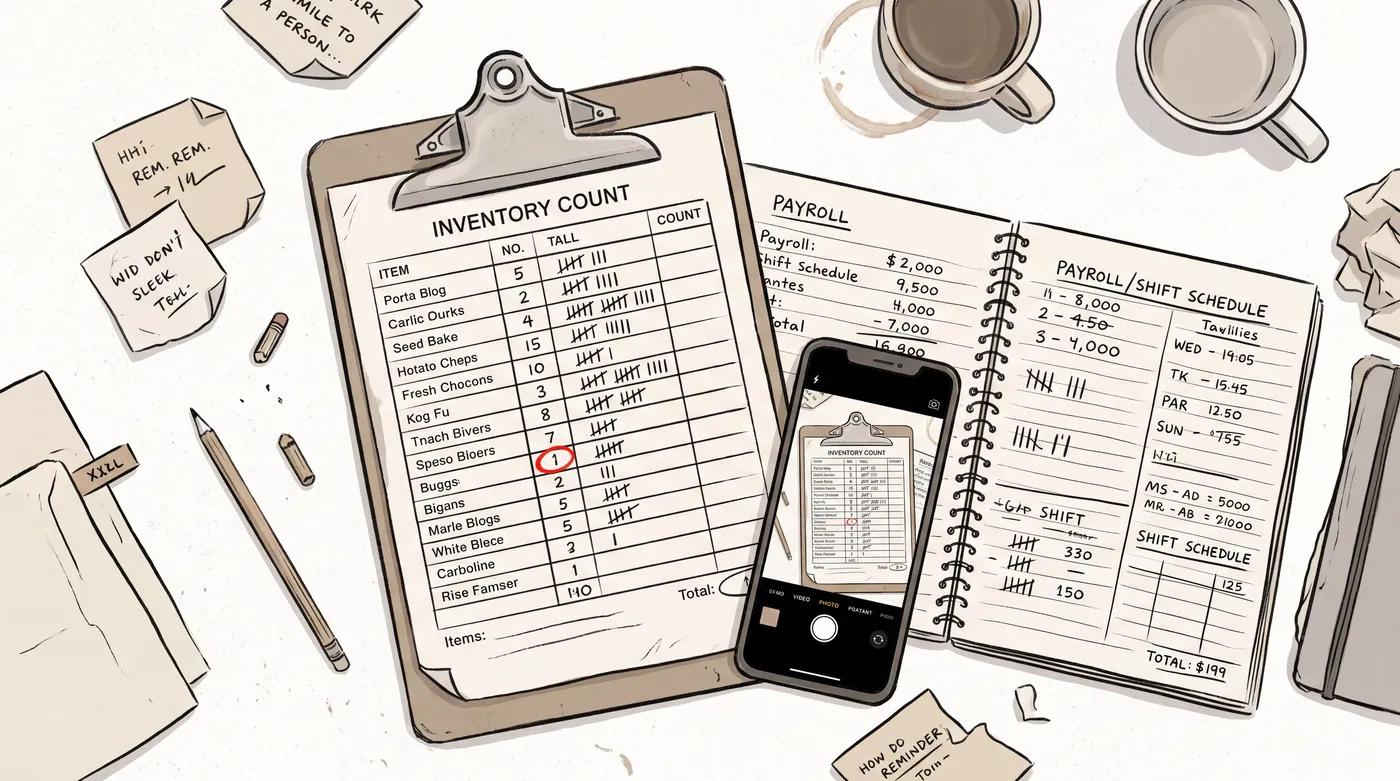
Today that day lives in notebooks, clipboard photos, and a payroll book someone deciphers every two weeks, and every location does it a little differently. MerchLogs runs the same day the same way everywhere, with nothing copied twice.

Hand-drawn scene of the old way: a clipboard count sheet, a payroll notebook of pencil tallies, and a phone photographing the clipboard
The current system of record.
  1. 01

    Open the day

    The schedule is already set. As people arrive they punch in on the board, and their hours start counting.

  2. 02

    Count and order

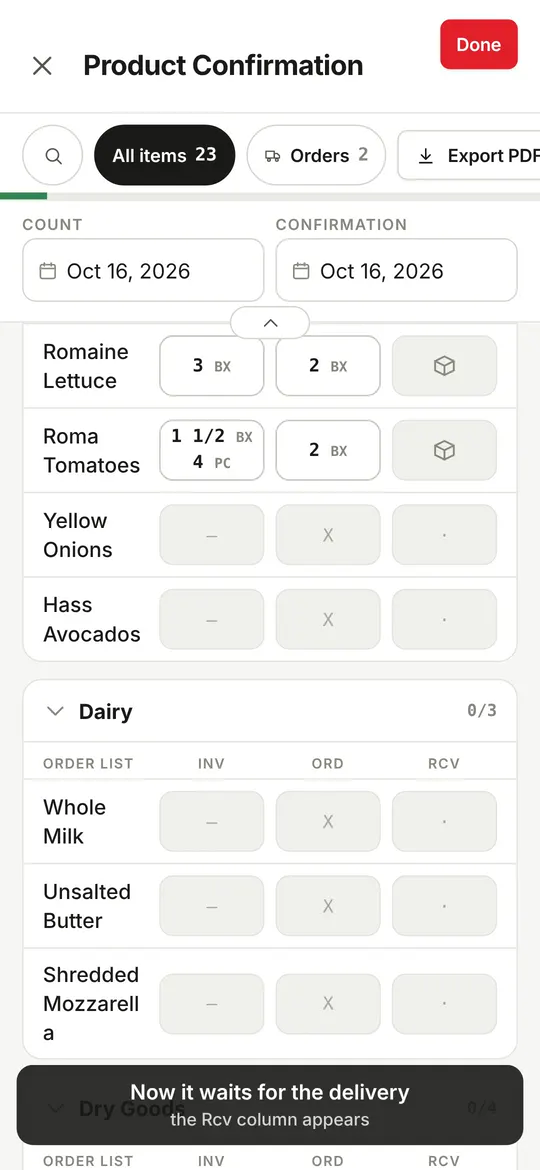
    Type in what is on hand, with recent quantities suggested as you go. The walk-in has no signal and it does not matter. Export the order as a PDF and send it up.

  3. 03

    Receive

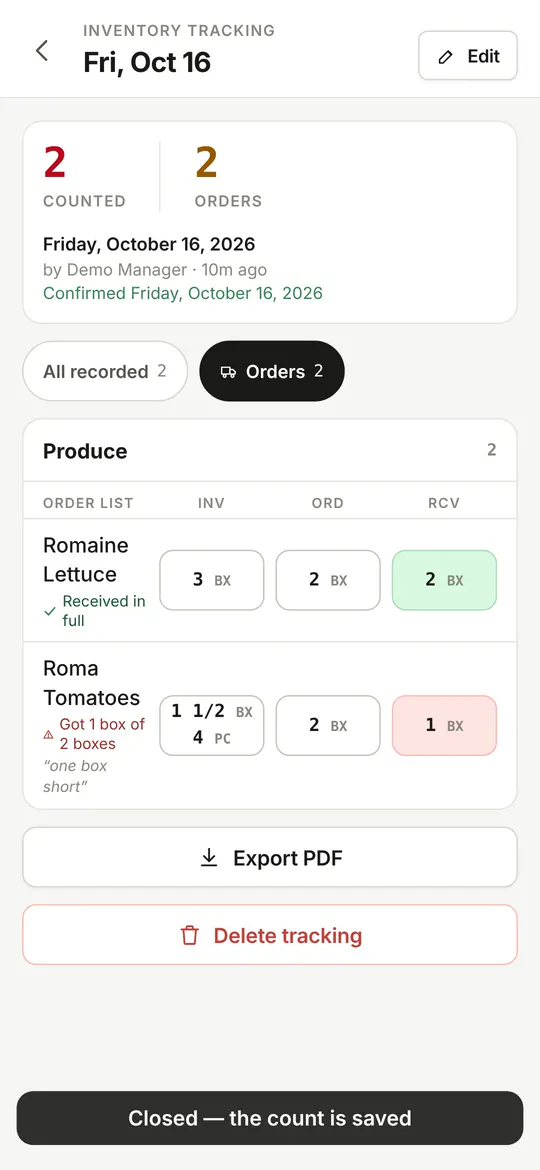
    Check each line against what you ordered. Shortages, substitutions and damage get noted on the spot.

  4. 04

    Close the day

    Breaks came off on their own, forgotten punch-outs get flagged, and the hours land in the pay-period totals.

Inventory Tracking

Everything you need to track stock.

  • Counts save as you type, on the device first, so a dead spot in the walk-in changes nothing.
  • Order with one-tap suggestions from recent counts, then export the count and order as one PDF.
  • Check deliveries line by line, with a comment on anything short or damaged, saved to history.
  • Boxes, packs or pieces, and fractions, with an item’s earlier counts charted right where you type.
Try a count in the demo
Ordering and confirming a count in the app: order quantities beside the counted stock
Ordering and confirming
Checking a delivery in the app: each line compared against the order
Checking a delivery
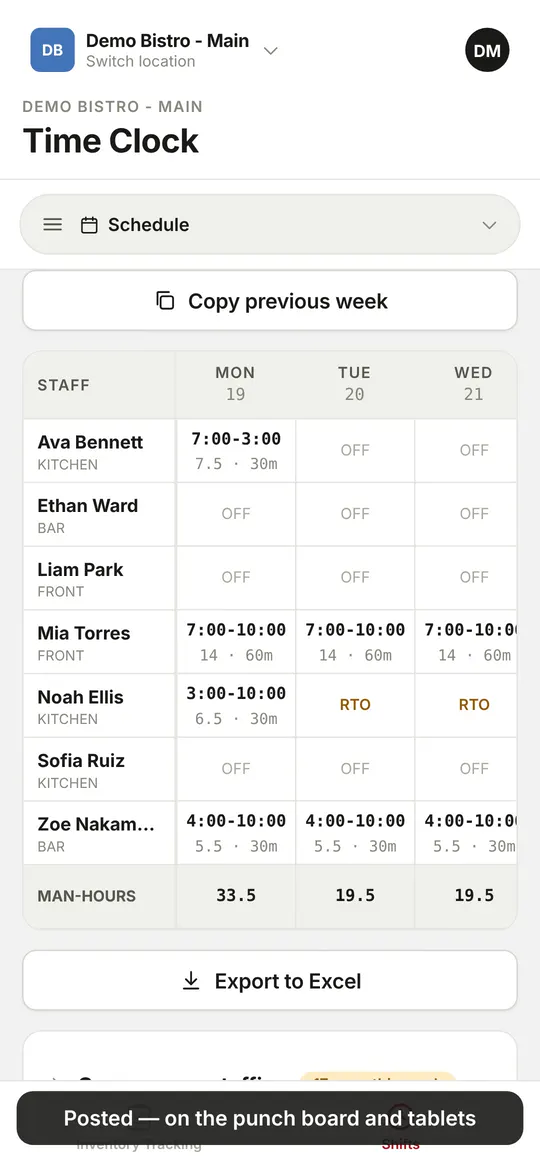
Publishing the week in the app: the drafted schedule posted for staff
Publishing the week
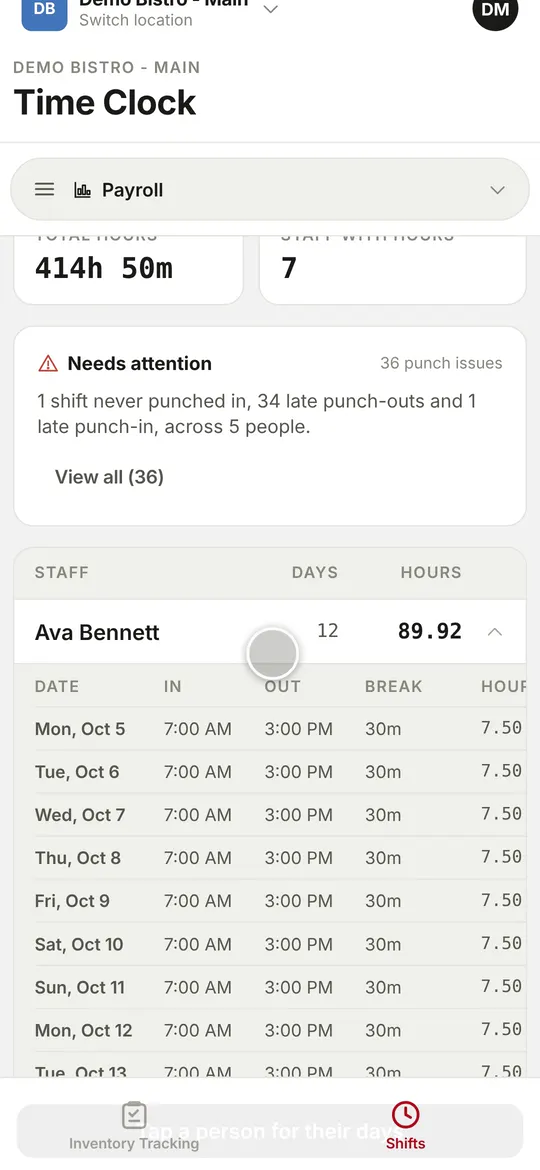
Reviewing payroll hours in the app: each person’s days, hours and breaks for the pay period
Payroll hours
Shift Management

The week drafts itself.

  • The week drafted in two taps from availability, time off and per-station skill. Nobody is booked at two sites at once.
  • Staffing gaps flagged before you publish, day by day, with who could fill each one.
  • Forgotten punch-outs flagged on the punch board, and fixed there, so the totals stay honest.
  • Payroll-ready hours by pay period, with a per-day breakdown, and the week exported to Excel.
Try the scheduler in the demo
Reports

The numbers behind the counts.

Every count, order and delivery check is a record. Reports read them back by item, by delivery and across every location, over the last 14 to 90 days or all time.

An item’s numbers

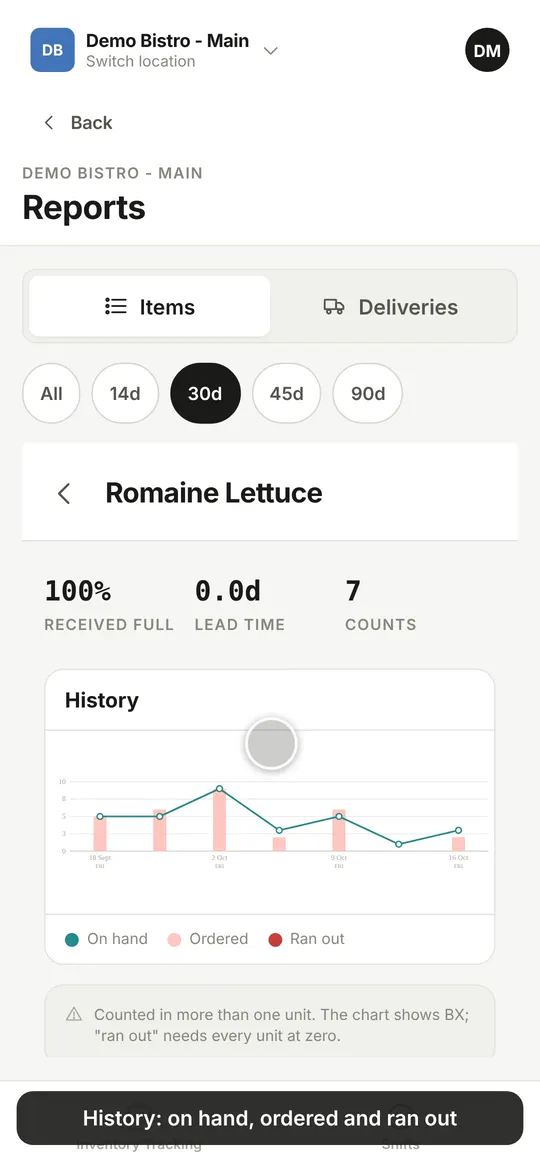
How often it ran out, what was ordered, how much arrived in full and the lead time, with a chart of stock on hand and orders over time. The items that ran out most come first.

Deliveries

Which lines arrived short, which are still waiting to be checked and how old the oldest is, and a fill rate per item, worst first.

All inventory

Every location’s latest count on one page: items down the side, a column per site. Out of stock shows red, and it works offline.

An item’s report in the app: ran out, ordered, received full and lead time above a history chart
Reading an item’s report
AI, with you in the loop

It reads your notes and answers your questions. It never edits your records.

Four places in MerchLogs use a language model. Each one proposes, summarises or answers. A person confirms every change, and every answer links to where it came from.

Ask for help, in your own words

Tap the round ? at the top of the screen. Answers come from the built-in guide and from your own records: this week’s schedule for George, how many bananas were ordered last week, whether Lily is free on Friday. Each answer lists the topic or record it read, and it sees only what you can already see.

Read notes

Paste what staff told you, like “Maria can only do Tuesday mornings, Dev is off the 22nd to the 25th.” The app proposes the availability and time-off changes, shows before and after beside your words, and saves nothing until you tick what you want.

Long warning lists, summed up

A draft week with many warnings, or a pay period with many punch issues, gets one plain sentence with the details one tap away. The sentence only repeats what the app recorded, and the full list is always there.

Your catalog from a photo

Send the MerchLogs team a photo or screenshot of your stock list. It is read into categories and items, checked by a person and loaded, so day one starts with your list rather than a blank one.

These four need a connection. Counting, punching and scheduling do not.

Everything else

Built for the tablet on the counter and the phone in your pocket.

Told when something needs you

A count submitted, a delivery confirmed, a week published or changed, a call-in, a missed punch in or out. Each one is a push notification, an email, or part of one daily or weekly summary, and each switches off on its own.

The guide is in the app

App documentation explains every screen, with a search that works offline and short clips of the app doing the steps. What’s new lists every change since the first release.

A paper trail that writes itself

Every punch, correction, shift and staff change is recorded with who made it and when. Entries in the activity log can never be edited or removed.

Ask for a missing item

Staff and admins request an item or category from the item list. The MerchLogs team approves or denies it, or an admin of yours they have given item management, and the answer shows on the same screen.

One shared tablet, or everyone’s phone

A tablet by the kitchen signed in as the device runs the punch board and the posted schedule. The same app runs on iPhone and Android, and in a browser, where it installs with its own window for the office computer.

Several devices, one count

Two tablets can work the same count or the same punch board at once, and each sees the other’s changes when it is online. Pending changes shows exactly what is still waiting to send.

Pricing

Two tools. Pay for what you use.

Priced per location, per month. Start with what you need and add the other anytime, with no add-ons and no tiers.

Inventory Tracking

Most start here
$99/ location / mo

Counts, orders and deliveries, one live sheet.

  • Live counts on phone, tablet, or computer
  • Counts that keep working with no connection
  • Order quantities with one-tap suggestions
  • PDF export of the count and order
  • Delivery checks, line by line
  • Reports per item, per delivery and across locations
Talk to us

Shift Management

$249/ location / mo

The schedule, the punch clock, and the week drafted for you.

  • Punch in, punch out, and breaks on one board
  • The day’s schedule with stations, covers and call-ins
  • Forgotten punch-outs flagged
  • Payroll-ready hours by pay period
  • Availability, time off, and per-station skill
  • A drafted week in two taps, no double-booking
  • Review, adjust, publish, and export to Excel
Talk to us
Questions

Before you email us.

What devices does MerchLogs work on?
iPhone, iPad and Android phones and tablets, and any computer through a web browser. Counts and punches save on the device as your team types them, and keep working with no connection.
Can it track multiple locations?
Yes. Each restaurant has one shared item catalog with separate counts per location, and you switch between locations in a couple of taps.
How do orders go out?
You export the count and order together as one PDF and send it to whoever handles delivery, without retyping anything.
Do my staff each need an account?
No. A shared tablet signed in as the device runs the punch board for the whole crew. App access is handed out only to the people who need it.
How much does MerchLogs cost?
Per location, per month: Inventory Tracking is $99 and Shift Management is $249. Start with one and add the other anytime.
Who is MerchLogs for?
Made for restaurants, and useful anywhere a team counts stock, checks deliveries and runs a crew: cafés and bakeries, bars, catering, food trucks and stockrooms.
Is AI changing my records?
No. The help assistant answers questions and looks things up. Read notes proposes availability changes that you tick before they save. Summaries only restate what the app already recorded.
Does it work on a desktop computer?
Yes, in a browser. The web version installs with its own window and icon, and reports, payroll and the schedule all work from there.

Contact

Tell us about your operation.

How many locations do you run, and what do counting and payroll day look like today? Send a few lines and we will show you what they look like in MerchLogs.

contact@merchlogs.com

Already using MerchLogs? Get help with the app to report a problem or ask a question.

Contact details

Goes straight to our inbox.